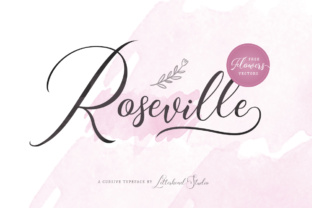
Roseville Script: A Modern Typeface That Elevates Handmade Creations
There’s something special about the right font. When you're crafting labels for your latest batch of soy candles or designing a set of wedding invitations, the typeface you choose can make all the difference. I recently discovered Roseville Script, and it has quickly become one of my go-to fonts for adding that touch of elegance to my handmade products.
As a small-batch candle maker who also dabbles in printable design and seasonal stationery, I spend a lot of time choosing just the right details to bring out the personality of each product. Typography plays a big role in how customers perceive what they’re seeing — and Roseville Script delivers in a way few others do. Its natural hand writing style feels both refined and authentic, making it perfect for anything from boutique packaging to digital downloads.
Bringing Roseville Script to Life on Product Labels
One afternoon while prepping new candle labels, I was scrolling through my font library looking for something that felt fresh yet timeless. I landed on Roseville Script, and the moment I saw it in action, I knew it would work beautifully. The curves are soft but not overly ornate, and there's a subtle sophistication that makes even simple words feel luxurious.
I used it for the name of my signature scent: “Coastal Drift.” Printed in a muted gold foil on kraft paper tags, the script added just the right amount of visual interest without overwhelming the clean design. It paired perfectly with a minimalist sans serif font for the secondary text, giving the label a balanced look that still stood out on the shelf.
A Versatile Font for Stationery and Seasonal Projects
Roseville Script isn’t limited to candles. I’ve found it incredibly useful for greeting cards, especially when I’m going for a more elegant or vintage-inspired aesthetic. For a recent birthday card collection, I paired it with a soft watercolor background and a few delicate illustrations. The result? A cohesive set that felt like a personal note from the heart — exactly what handmade stationery should be.
Wedding invitations have been another area where this font shines. Whether I'm creating save-the-dates, place cards, or thank-you notes, Roseville Script adds an air of class and charm. I particularly love using it for names and titles, where its fluidity and decorative touches really come into play. On a welcome board I designed for a couple’s rustic barn wedding, the script read “Welcome to Our Day” in a large, open format, drawing guests in with warmth and style.
Readability Tips for Real-World Use
Though Roseville Script is undeniably beautiful, it’s important to consider its use carefully depending on the medium. Because it's a script font, it works best in display sizes rather than body text. For example:
- Cutting machines (Cricut or Silhouette): The font performs well at larger point sizes. I've used it for SVG-style designs on wooden signs and metal plant tags, adjusting the stroke weight slightly to ensure clean cuts.
- Small stickers or product tags: Stick to shorter phrases and avoid complex ligatures or swashes. Simpler forms of the letters maintain clarity and cut better on smaller surfaces.
- Printed cards and wall art: At 24pt or higher, the font looks stunning. I often test print samples at home before moving to professional printing to see how it holds up.
- Digital templates and mockups: Use Roseville Script as a preview font in listing images. It helps buyers visualize how the final product will look and builds anticipation for the real thing.
Creating Brand Consistency with a Premium Font
Brand identity is everything these days, especially if you're selling on Etsy or other platforms. I started using Roseville Script across multiple elements of my shop — from the logo to the packaging seals and even social media headers. This helped create a unified visual language that customers began to recognize and associate with quality and attention to detail.
Its modern handwriting feel gives my brand a personal touch, which is key in handmade and craft circles. People want to connect with the creator behind the product, and the right typography can help bridge that gap. I’ve noticed that when I use Roseville Script consistently, it reinforces the idea that every item is made with intention and care.
Font Pairing Ideas for Creative Balance
While Roseville Script stands out on its own, pairing it with the right supporting font can enhance your overall design. Here are a few combinations I’ve tried and loved:
- Roseville Script + Lora (serif): Ideal for editorial-style layouts, such as planner pages or journal inserts. The contrast between the flowing script and the grounded serif creates a rich typographic rhythm.
- Roseville Script + Montserrat (sans serif): Works great for minimalist branding or packaging. The clean lines of Montserrat let Roseville shine while keeping the layout easy to read.
- Roseville Script + Another Script Amp font: If you're layering scripts for a more dynamic look, try combining it with a simpler handwritten font for depth and movement.
When designing for commercial use, always check the included styles and file formats. Roseville Script offers several weights and alternates, which gives you flexibility in tone and mood. I especially appreciate the multilingual support, as it allows me to offer custom designs to a broader audience.
Designing Digital Printables and Shop Materials
As someone who sells digital printables, I know how important it is for the font to render clearly in PDFs and JPEG previews. Roseville Script handles this beautifully. Its letterforms stay crisp even when scaled down, so when customers download a wall art template or planner page, the text remains legible and aesthetically pleasing.
I’ve used it for holiday tags, farmhouse-style quotes, and even mug designs. One of my favorite uses was for a set of autumn-themed printable garlands. The script gave the phrases a warm, inviting feel that matched the cozy imagery I used. I also made sure to include clear instructions in a more utilitarian font so the user experience wasn’t compromised by the decorative style.
Practical Advice for Commercial Use
If you plan to sell products featuring Roseville Script, make sure to verify that the font license supports commercial use. Many Script Amp fonts are available for both personal and business projects, but it's always wise to double-check before finalizing any design intended for resale.
Also, consider testing the font in different contexts. I once tried using it for a long description on a tote bag and found that it became too busy. Better suited for short, impactful phrases like brand names, product titles, or taglines. Always keep the purpose in mind — this is a display font, not a body font.
Seasonal Crafting and Beyond
With the holidays approaching, I’ve been experimenting with Roseville Script for festive items like gift tags, advent calendars, and printable ornaments. The font’s gentle curves and elegant flair lend themselves perfectly to holiday cheer, and I’ve found it especially effective for handwritten-style sentiments.
For a recent project, I designed a set of personalized holiday mugs using Roseville Script for the main text and a bold sans serif for the accent. The combination created a layered, dimensional look that felt both professional and approachable. Customers loved how the font gave the mug a bespoke, luxury feel — even though it was mass-produced for affordability.
It's also worked well for signage in my shop window and for promotional banners on social media. The modern yet organic style fits neatly within the realm of today’s popular aesthetics, from farmhouse chic to bohemian minimalism.
Why Choose Roseville Script?
Here’s what sets Roseville Script apart for creative makers:
- Its handwritten style feels personal and authentic.
- The modern structure ensures it won’t look dated in years to come.
- It complements a wide range of design styles, from rustic to urban.
- Multiple weights and alternates allow for creative variation.
- Great for branding, packaging, and display typography.
- Supports a variety of languages and is suitable for both digital and physical outputs.
Whether you're working with cutting machines, designing logos, or preparing mockups for your next launch, Roseville Script brings a level of polish that elevates your work. It’s a versatile asset in your design toolkit, capable of adapting to various applications while maintaining its core appeal.
Final Thoughts on Designing with Roseville Script
Incorporating the right typeface into your creative process isn’t just about aesthetics — it’s about storytelling. Roseville Script helps me communicate the feeling I want my products to evoke. From the first brushstroke of a label to the last detail on a printed invitation, it enhances the emotional impact and perceived value of each piece.
So if you're a maker looking to refine your shop’s visual identity or simply add a bit of luxury to your next project, give Roseville Script a try. You might just find that it becomes a staple in your design workflow, helping your handmade creations speak louder than ever before.